Note: the Bulk Costing and Analysis module requires a separate license.
Use Bulk Costing and Analysis to analyze multiple components at the same time, to quickly identify cost-reduction opportunities for groups of components. You can specify different scenarios and compare their costs. For example, you can compare production costs in different regions, countries, and volumes.
Tip: See also the Introduction to Bulk Costing and Perform Bulk and Matrix Costing aP Academy training courses.
Process Overview
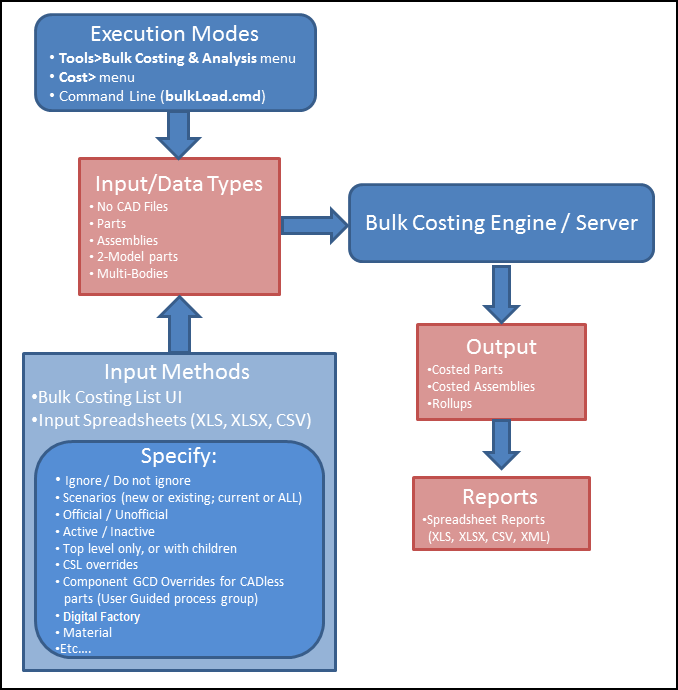
You can quickly generate preliminary costs for groups of parts, by setting their initial costing parameters using a tabular interface, then bulk costing:
Run Bulk Costing
Select Tools > Bulk Costing & Analysis to display the Bulk Costing & Analysis window.
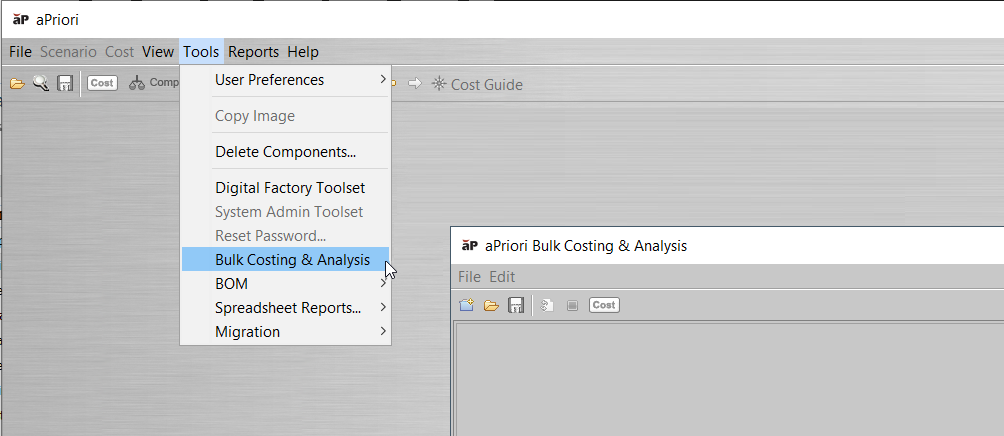
See Bulk Costing Using the UI and Bulk Costing Menu Commands.
After setting inputs, you can then cost (analyze) the components in this bulk cost group. See Costing a bulk cost group.
Alternative methods to run Bulk Costing
-
Bulk costing also allows you to take data from a spreadsheet; for example, to define all production inputs, add secondary processes, and override PSOs. See Supply Bulk Costing Data from a Spreadsheet.
-
You can also run bulk costing from the command line, using CSV or Excel content for input. See Running from the Command Line.